What Is E-Bike Navigation on the Handlebar Display?
E-Bike Navigation on the Handlebar Display
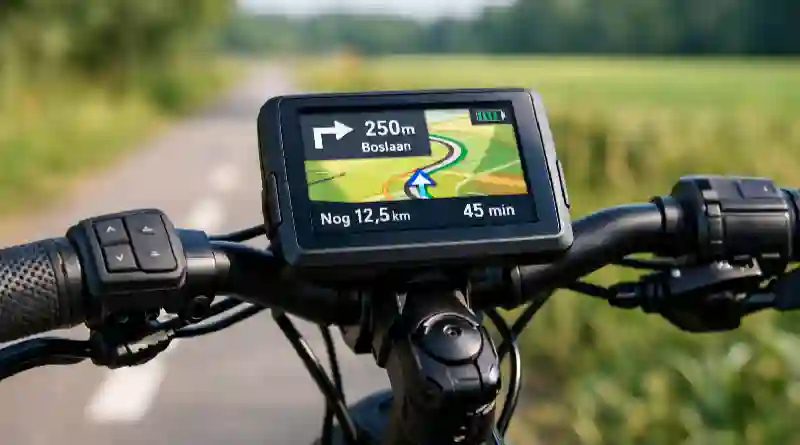
E-bike navigation via the display on the handlebars means you can see route information directly on the screen of your bike. More and more modern e-bikes have a built-in display that shows not only speed, battery status and assistance, but also turn-by-turn directions.
Instead of a separate cycle computer or smartphone on the handlebars, the route appears right on the e-bike display. This makes riding clearer and safer, because you get less distracted while cycling.
Do you want to know more about how electric bikes work? Then also read our article on e-bike technology:
https://www.defietssite.nl/e-bike-technologie/
How Does E-Bike Navigation Work on the Display?
Navigation via the display usually works together with the manufacturer’s smartphone app. In the app, you can plan a route or import an existing one. As soon as you start the route, the app sends it to the e-bike display over Bluetooth.
While you ride, the screen then shows:
- arrows for turn directions
- distance to the next turn
- remaining distance of the route
- sometimes a map of the surroundings
Some systems also warn you when you leave the route.
Bosch Smart System
The Bosch Kiox 300, Kiox 500 and Nyon display offer extensive navigation. You plan routes in the Bosch eBike Flow app, which then sends them to the display.
The Nyon display can even show full maps, much like a cycle computer.
Shimano Steps
With Shimano Steps, you usually use navigation together with apps such as Komoot or Shimano’s own E-Tube app. The display shows simple route instructions.
Garmin and Wahoo Integration
Some e-bikes can link to external cycle computers such as Garmin or Wahoo. This lets you use professional navigation, including elevation profiles and detailed route analysis.
If you like riding longer routes, a bike repair kit is also handy to bring along:
https://www.defietssite.nl/reparatieset-voor-de-fiets/
Benefits of E-Bike Navigation on the Handlebar Display
Navigation on an e-bike display has several benefits for cyclists.
More safety
You need to look at your phone less often while cycling.
Clear riding
The directions are right in your field of view.
Made specially for cyclists
Routes are often optimised for cycle paths and quiet roads.
Integration with the bike
Navigation works together with other bike data, such as battery use and remaining range.
When Is E-Bike Navigation Useful?
Navigation via the display is especially useful for:
- leisure bike rides
- cycling holidays
- commuting
- gravel and mountain bike routes
- discovering new cycle routes
More and more cyclists use navigation to explore unfamiliar areas without constantly looking at their phone.
The Netherlands also has an extensive network of cycle paths and cycle tunnels. Read more about this in our article on cycling infrastructure in the Netherlands:
https://www.defietssite.nl/fietsinfrastructuur/
The Future of E-Bike Navigation
Developments are moving fast. New e-bikes get bigger and sharper displays. App integration is also improving, which makes route planning easier.
In future, navigation systems will probably get even smarter. Think of automatic route adjustment, weather information while cycling and integration with traffic information for cyclists.
After looking at e-bike navigation via the handlebar display, a few practical questions often remain. Below, we answer the most common ones.
Frequently Asked Questions About E-Bike Navigation
Can every e-bike show navigation on the display?
No, not every e-bike supports navigation via the display. It depends on the type of display and the motor system. Modern systems such as Bosch Smart System or Shimano Steps often do offer navigation options.
Do you need a smartphone for e-bike navigation?
In most cases, yes. You use the smartphone to plan the route and send it to the bike. Some advanced displays can also work out routes on their own.
Does navigation use extra e-bike battery?
Navigation uses a small amount of extra energy, but this is usually minimal. The display and the Bluetooth connection use little power compared with the motor of the e-bike.
Can you use GPX routes on an e-bike display?
Yes, with many systems you can import GPX files through apps such as Komoot or the matching e-bike app. The display then shows these routes while you ride.